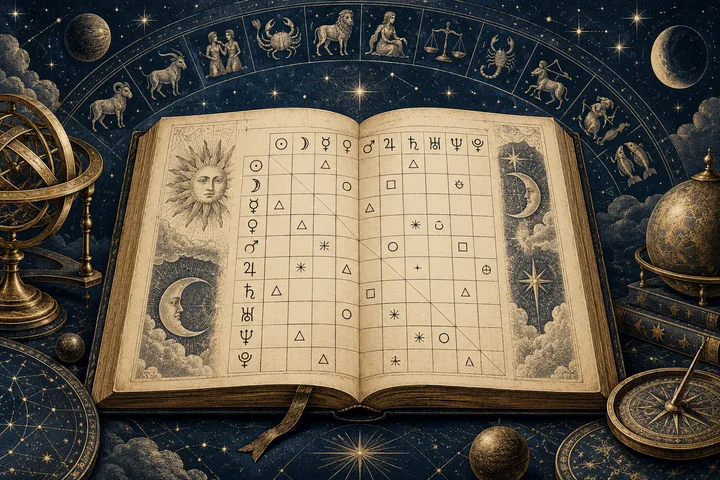
Read the table in three passes: people, aspect, orb
When a table looks crowded, don’t interpret the whole grid at once. Read one cell in three passes: name the placements, translate the aspect mark, then check the orb and settings. This keeps a symbol from becoming a relationship judgment before you know what it connects.
A synastry aspect table maps selected angular contacts between placements in two natal charts. The Synastry Chart guide describes one matrix: Person A’s planets run down the rows, Person B’s across the columns, and each cell reports their aspect. Begin with its labels. Write the endpoints plainly: whose placement meets whose? If the person key is missing, pause. The aspect symbol cannot identify its owner.
Next, use the table’s legend to name the angle. The standard reference points are conjunction at 0°, sextile at 60°, square at 90°, trine at 120°, and opposition at 180°, as listed in An Introduction to Aspects and Chart Shaping in Natal Astrology. A program may show a glyph, word, or abbreviation; its legend outranks remembered shorthand. Then read the orb, the distance from exactness, alongside settings that decide which contacts appear. That reference explains orb allowances can vary by aspect or planets involved. The number needs its rule set.
Only after those checks does interpretation begin. The table gives you geometry; the planetary pair and signs give you material to read. If a mark or setting remains unclear, leave it undecoded. Start with one confirmed cell.
Sources: Synastry Chart; An Introduction to Aspects and Chart Shaping in Natal Astrology
Which two placements does this cell connect?
Start at the labels around the cell, not at the symbol in its center. A synastry table compares placements from two natal charts, so each cell belongs to a pair: one placement from Person A and one from Person B. Read the row label and column label first. Then you’ll know whose chart each endpoint comes from before you try to interpret the aspect mark.
The layout isn’t universal. HOSHIDOU’s Synastry Chart guide shows one layout: its matrix places Person A’s planets in rows and Person B’s planets in columns. Each cell shows an aspect formed between that pair, along with its orb. It distinguishes these cross-chart contacts from aspects within one person’s chart. Another program may reverse the rows and columns, use a different visual arrangement, or let you select which points appear. Follow the names printed on your table rather than assuming the left side always belongs to one person.
a planet glyph identifies an astrological point, not the person it belongs to. If you see a Moon symbol in a row and a Venus symbol in a column, trace both labels to their chart owners. Depending on the table’s orientation, the cell may represent Person A’s Moon in aspect to Person B’s Venus, or the reverse. Naming the owners keeps the reading precise. Some tables can include points beyond planets, such as angles or other chart factors. Read the row and column captions to see what each symbol represents; don’t classify every mark as a planet by appearance alone.
A blank cell also needs a careful reading. It means the table displays no selected aspect for those endpoints under its current settings. It doesn’t establish that the two people have no connection, or that the placements have no meaning in a broader chart reading. HOSHIDOU notes that its displayed planets and orb values are controlled by its Points & Aspects Settings. That makes the blank a statement about this table’s selection rules, not a verdict about the relationship.
Before decoding the center mark, write the endpoints in plain language: “Person A’s [placement] to Person B’s [placement].” If the table’s labels don’t let you identify both owners, pause and find its legend or view settings. Once the pair is clear, you can ask what aspect connects them.
Sources: Synastry Chart
What do the familiar glyphs and abbreviations stand for?
The five common major aspects are conjunction, sextile, square, trine, and opposition. Their glyphs stand for angular relationships between two chart points: 0°, 60°, 90°, 120°, and 180° apart around the zodiac circle. Start with the named aspect when the table provides one. If it shows only a mark, use the table’s own legend to translate it. Glyphs can look alike at small sizes, and a font may fail to display one clearly. The key or text label takes priority over a symbol you think you recognize. Some tables show aspect names in a list beside glyphs, while others place shorthand directly inside each cell. A quick reference helps once you know which notation the chart uses: Conjunction (0°): ☌. Astrolog’s abbreviation is Con. Sextile (60°): ⚹. Astrolog uses Sex. Square (90°): □. Astrolog uses Squ. Trine (120°): △. Astrolog uses Tri. Opposition (180°): ☍. Astrolog uses Opp. The angle is the separation along the zodiac circle, not a score or measure of how much two people care. A conjunction brings two points together; an opposition places them across the circle. A square marks a quarter-turn, a trine a third, and a sextile a sixth. Geometry names the aspect; it does not tell you how the contact will feel in a relationship. Treat the abbreviations as examples, not a universal code. In the Astrolog software documentation, the default list pairs Con with Conjunct, Opp with Opposition, Squ with Square, Tri with Trine, and Sex with Sextile. That is a software-specific naming scheme. So if a cell says “Sex,” read it as sextile only when the chart’s key confirms that convention. The reference table in An Introduction to Aspects and Chart Shaping in Natal Astrology names the five major aspects and gives their familiar angles. It also lists minor aspects, a useful reminder that an unfamiliar mark may still be an aspect rather than a planet or an error. When the mark is unclear, follow this order: read the row and column labels, find the matching symbol or abbreviation in the legend, then confirm the aspect name. If no key is available, keep the cell undecoded until you can check the software or source that produced it. Once the name is clear, you can move on to the angle and orb, then read the two planets and their signs as one specific synastry contact. The useful habit is simple: translate first, interpret second.
Sources: An Introduction to Aspects and Chart Shaping in Natal Astrology; Distance Aspects
Why might the table show a minor aspect or leave a cell blank?
An unfamiliar mark may name a minor aspect, and an empty cell may reflect the table’s selected aspect list or cutoff. Check what the software includes before treating either as a message about the relationship. A chart table is a display of chosen contacts. It doesn’t promise to show every angular relationship an astrologer might consider.
Start with the familiar five major aspects: conjunction, sextile, square, trine, and opposition. Other angles can appear as minor aspects. The reference table in An Introduction to Aspects and Chart Shaping in Natal Astrology includes the semisextile, semisquare, sesquiquadrate, and quincunx; it gives the quincunx the alternate name inconjunct. The names may be written out, shortened, or represented by glyphs. So an unfamiliar mark isn’t necessarily a display error. First match it to the legend, then confirm the angle or aspect name if the table provides one. Don’t infer its meaning from the shape alone.
The word minor describes a category in an aspect system, not a command to ignore the contact. An Introduction to Aspects and Chart Shaping in Natal Astrology says major aspects are generally given more weight, while also noting that some astrologers emphasize minor aspects more than usual. That difference matters: a table can list an aspect without deciding how important it should be in your reading. Learn what the mark denotes before deciding whether it belongs in the interpretation, and keep the interpretive weight consistent with the method you’re using.
A blank cell needs the same care. DivineAPI’s Aspect Table documentation shows one provider’s settings: users can request all supported aspects, major aspects only, minor aspects only, or a custom list. Its examples include quintile, biquintile, novile, and septile among supported minor aspects. This doesn’t establish a universal list; it shows why a table’s settings matter. A cell may remain empty because the selected list excludes that aspect, or because the contact falls outside the configured orb. The points included in the display matter too. HOSHIDOU’s Synastry Chart documentation describes a matrix built from the points its view selects, with each cell reporting a displayed contact and orb. A matrix can only show contacts between the entries it includes.
Use a short check before drawing a conclusion: open the legend, inspect the aspect selection, and look for an orb cutoff or point filter. If those settings aren’t available, mark the glyph or blank cell as undecoded. You can still read other confirmed cells. But don’t call the blank proof that two placements have no connection, or the unfamiliar mark a special sign about the relationship. It tells you what this table displays under its rules. It doesn’t settle what the whole synastry chart means.
Read one cell in three passes: identify whose placements meet, translate the aspect mark using that table’s legend, then check the orb and settings. The familiar major aspects are conjunction, sextile, square, trine, and opposition. Shorthand and display rules can vary by program, so an unclear mark stays undecoded until you find its key. Once the endpoints and aspect are clear, read the planetary exchange with sign context. Treat the result as a theme to explore, not a relationship verdict.
Sources: An Introduction to Aspects and Chart Shaping in Natal Astrology; Aspect Table; Synastry Chart
How does the angle shape the planetary exchange?
Once you know which two placements meet and what the aspect is called, read the angle as the relationship between their planetary principles. The planets name the subjects; the aspect describes how those subjects combine. A conjunction brings them into close contact, sextile and trine are commonly read as easier connections, while square introduces friction and opposition a polarity to work with. These are starting descriptions, not grades for a relationship. “An Introduction to Aspects and Chart Shaping in Natal Astrology” says harmonious and tense contacts each have more than one face: ease can leave a capacity unused, while friction can call for effort and development. “Reading Synastry Aspects: A Beginner’s Guide to Couple Charts” also cautions against treating a synastry square as a verdict. Its orb values belong to that site’s engine, not a universal rule. Together, these sources support a useful habit: name the aspect’s style, then ask what the two planets bring to it. Don’t stop at “good” or “bad.” Consider an illustrative Venus-square-Mars cell. It isn’t a chart for real people. Venus can point to affection, attraction, and what feels pleasing; Mars to desire, initiative, and pursuit. A square between them can be read as an active difference in how these themes meet. One possible interpretation is attraction with a mismatch in pace: one person’s way of expressing interest may feel too forward or too indirect to the other. The same friction could invite clearer expression and adjustment between desire and affection. Neither reading follows automatically from the glyph. These are possibilities to test against the signs and the people’s actual interaction. For a real cell, keep the endpoints visible: whose Venus, whose Mars, and which aspect joins them. Reversing the direction changes the question. Your Venus to their Mars isn’t the same pairing as their Venus to your Mars. The Coeluna guide discusses Venus–Mars as attraction and pursuit; applying that idea to a particular pair is interpretation, not a prediction about anyone’s intentions. Then use each planet’s sign to refine how its theme may be expressed. Sign context adds texture, but it doesn’t replace the endpoints or turn a square into a fixed outcome. Treat the cell as a focused prompt: what patterns of affection and initiative feel easy between us, and where might we adjust our pace? That question gives the aspect practical meaning without asking one angle to speak for the relationship.
Sources: An Introduction to Aspects and Chart Shaping in Natal Astrology; Reading Synastry Aspects: A Beginner’s Guide to Couple Charts
What does the orb number tell you, and what can’t it tell you?
An orb is the distance between the actual angle formed by two placements and the exact angle of a named aspect. If a square is exact at 90° and the placements sit 2° from that angle, the table may show an orb of 2°. That number describes the contact’s closeness. It is not the maximum distance the chart allows before displaying a square. That second number is the orb allowance, or cutoff. A table may include a contact only when it falls within a chosen allowance, then show how far from exact it sits. An orb of 2° does not mean the program accepts every square within 2°; its cutoff could be wider or narrower. Check whether the settings state a fixed allowance, different allowances by aspect, or another rule. DivineAPI’s Aspect Table documentation, for example, offers fixed-degree and percentage orb modes. These are that provider’s options, not a rule all charts share. Astrologers also differ on how they set allowances. “An Introduction to Aspects and Chart Shaping in Natal Astrology” describes modern aspect-specific orbs and contrasts them with traditional approaches that account for the planets involved. Its example allows a wider orb for the Sun and Moon than for Mercury and Venus. This is one approach to natal aspects, not a universal synastry cutoff. The practical point is simple: a displayed orb has meaning only alongside the method that admitted the contact to the table. Within one consistent method, a smaller orb means the contact lies closer to exact and may receive more emphasis. But exactness is only one part of interpretation. A close square is not automatically more important than every wider trine. Consider which planetary functions meet, the aspect’s character, and the signs involved. A square may press; a trine may flow. Neither label decides what the full relationship means. The Coeluna guide shows why settings matter: its engine assigns different allowances to major aspects, and its reading advice gives closer contacts more emphasis. Treat its values as that guide’s settings, not standards for another chart. A comparison is fair only when both contacts come from the same table, or when you align the aspect list and cutoff rules. Otherwise, one method may admit a contact that the other would leave out. When you read a cell, record both figures if available: the displayed orb and the chart’s maximum allowance. If the allowance is missing, you can still note that one displayed contact is closer or wider than another in that table, but don’t assume how its maker selected the cell. Use closeness to guide attention, not to rank the whole relationship.
Sources: An Introduction to Aspects and Chart Shaping in Natal Astrology; Aspect Table; Reading Synastry Aspects: A Beginner’s Guide to Couple Charts
Why can two tables disagree about the same pair?
Two tables can disagree because “the same pair” may not mean the same displayed calculation. One table may include only the five major aspects; another may include minor aspects or a custom list. A contact omitted from one view may still fall within another view’s rules. Before judging the reading, compare what each table was asked to show. The settings documented in DivineAPI’s “Aspect Table” make this choice explicit: its aspect list can return all supported aspects, major aspects, minor aspects, or selected aspects. Its orb setting can use a fixed degree allowance or adjust a default by percentage. Those are this provider’s options, not universal rules. They show, though, why a contact near one table’s cutoff might appear in one result and vanish in another. A tool’s list of planets and other points matters too. If one table includes a point that the other excludes, their rows and possible contacts won’t match. Start by checking the endpoints. Confirm that both displays compare the same placement from Person A with the same placement from Person B. Then align the aspect selection: major only, minor only, or a custom list. Next compare orb mode and cutoff. Only after those checks should you compare the aspect name, exact angle, and displayed deviation. This order separates a calculation difference from a difference in what the interface chooses to show. The layout itself can change without changing the underlying contact. “Synastry Chart,” HOSHIDOU’s guide, describes its own matrix orientation and cell contents, while Astrolog’s “Distance Aspects” lists its own aspect abbreviations, angles, glyph descriptions, and orb defaults. The contrast is useful: a row and column arrangement belongs to a particular display, and an abbreviation such as “Tri” belongs to a particular notation key. Neither should be assumed to govern every chart. For a fair comparison, write down the two endpoints and the settings from each table. If the settings match, compare the reported aspect and orb. If they don’t, say exactly what differs, such as “this view includes minor aspects” or “this one uses a wider cutoff.” If settings aren’t available, keep the conclusion narrow: the tables display different results, and the reason remains unknown. Don’t choose a favorite based on color or a larger list alone. A difference in display is not yet a contradiction in interpretation; first establish that both tables use the same points and rules. That gives you a practical test. If endpoints, aspect list, and orb rules agree but the reported angle still differs, recheck the chart data and the table’s legend before interpreting the cell. If the settings cannot be found, treat the unmatched entry as undecoded.
Sources: Aspect Table; Synastry Chart; Distance Aspects
What do small letters or marks after the orb mean?
A small mark after an aspect can carry a separate piece of information. Read the cell as three layers: the aspect glyph or abbreviation, the orb number, and any suffix or visual flag that follows. The first names the angular relationship; the second records its distance from exact; the last may describe motion or simply reflect the program’s display. In a moving chart, “applying” describes two planets moving toward the exact angle of an aspect, while “separating” describes them moving away after that exact point. The introductory reference “An Introduction to Aspects and Chart Shaping in Natal Astrology” explains the distinction in those terms and notes that some traditions give applying aspects greater emphasis. That description concerns motion. A letter such as A or S may be used as shorthand in a particular table, but the mark itself is not self-defining. Check the key to learn whether it means applying or separating, and whether the program uses those labels for the chart type you’re reading. Synastry makes this check especially useful. A synastry table compares placements from two birth charts, each tied to a birth moment. The method note “What synastry is, and what the score is actually made of” says its comparison treats those natal positions as fixed and therefore does not assign applying or separating direction. It does show why an applying/separating suffix cannot be interpreted automatically in every synastry table: the table may use a different convention, or its method may not treat the label as relevant to two fixed charts. If a tool does display it, read that tool’s explanation before carrying the term over from a moving-chart technique. Imagine a cell that shows a square glyph, “2°,” and a small “A.” You can decode the first two parts if the legend confirms them: the two named placements form a square, and the displayed contact is two degrees from exact. But “A” remains uncertain until the table defines it. It might indicate applying under that program’s method; it might be another flag. Keep the square and orb in your notes, then leave the suffix undecoded. This is more accurate than treating a familiar letter as universal shorthand. The same caution applies to color, asterisk, parentheses, or a superscript. In “Synastry Chart,” HOSHIDOU documents its own matrix layout and the information shown in each cell, illustrating that a chart’s visual conventions belong to that display. The label belongs to the table’s design. When the key is missing, preserve what you can verify: identify both placements, write the aspect name, and copy the orb as displayed. Mark the trailing symbol as unknown, or consult the source’s documentation. Then interpret only the decoded contact. That small pause keeps a stray letter from steering the reading. Use the source’s own definition. A table should help you see the exchange between two placements; undocumented marks don’t get to decide what that exchange means.
Sources: An Introduction to Aspects and Chart Shaping in Natal Astrology; What synastry is, and what the score is actually made of; Synastry Chart
What is the next useful step after decoding one cell?
Once the cell is clear, translate it into one plain sentence: Person A’s named planet forms a named aspect to Person B’s named planet. Add each placement’s sign, then describe the theme the planets bring together and how the aspect shapes their exchange. Keep the wording open enough to invite reflection. A square might suggest a point where two styles press on each other; it doesn’t tell you what either person intends or how the relationship will turn out. Read the labels together, not as a verdict. Now connect that theme to something you can discuss. You might ask, “Where do we handle this differently, and what helps us meet in the middle?” Let the answer come from your actual experience. If the glyph, suffix, or settings remain unclear, leave that part undecoded and don’t rank the contact on a guess. A chart’s legend sets the limits of what its shorthand can tell you. If you want help organizing known placements, the Synastry Comparison Report compares supplied Moon, Venus, and Mars signs, with optional degrees. It doesn’t calculate a natal chart from birth details or decode an uploaded table. Bring the decoded theme into the conversation, then judge it alongside how you treat each other.
Sources: Synastry Chart
A little more clarity
What are the five major aspects in a synastry table?
The common major aspects are conjunction (0°), sextile (60°), square (90°), trine (120°), and opposition (180°). Use the table’s legend to confirm its glyphs or abbreviations.
Does a blank cell mean there is no connection?
No. It means the table displays no selected aspect between those entries under its current settings. Check which points and aspects the table includes and what orb cutoff it uses.
What should I do if I can’t identify a symbol or suffix?
Check the table’s legend or the documentation for the program that produced it. Record what you can verify, such as the endpoints, aspect, and orb, and leave any unexplained mark undecoded.
Sources & further reading
- Synastry Chart
Documents one matrix layout, its cross-chart cells, displayed orbs, and point and aspect settings.
- An Introduction to Aspects and Chart Shaping in Natal Astrology
Lists common aspect angles and minor aspects, and explains aspect geometry, interpretation, and orb allowances.
- Distance Aspects
Lists Astrolog’s own aspect names, abbreviations, glyph descriptions, angles, and orb defaults.
- Aspect Table
Documents configurable aspect lists and fixed-degree or percentage orb options for this provider.
- Reading Synastry Aspects: A Beginner’s Guide to Couple Charts
Offers one interpretive approach to synastry aspects and cautions against treating a square as a verdict.
- What synastry is, and what the score is actually made of
Describes one provider’s fixed natal-position method and its choice not to assign applying or separating direction.
Synastry Comparison Report
Enter known placements for two people. Get an input-by-input comparison, selected aspect calculations and a clear record of what remains uncertain.
Compare our placements